Merakify User Guide

Complete guide to all features

Welcome to Merakify

Your AI-powered story development platform for screenwriters, authors, and filmmakers. This comprehensive guide will walk you through every feature to help you create compelling stories and bring them to production.

10
Main Sections
35+
AI Features
6
Analysis Tools
2
Writing Modes

Getting Started

Get up and running with Merakify in just a few minutes. Whether you're a screenwriter working on your next feature, an author developing a novel, or a producer evaluating scripts, this quick start guide will help you make the most of the platform.

Two Writing Modes

Merakify supports two distinct content types, each with specialized tools:

Screenplay Mode (SP)

For formatted screenplays with scene headers, dialogue, and action lines. Upload existing scripts or write directly in proper screenplay format.

  • Parse existing PDFs/scripts
  • Auto-extract characters & scenes
  • Industry-standard formatting

Prose Mode

For novels, short stories, and narrative content. Write freely and let AI help structure your story.

  • AI character extraction
  • Scene breakdown generation
  • Convert to screenplay format

Quick Start Steps

1

Create Your Story

Click '+ New Story' on the dashboard. Choose Screenplay or Prose mode based on your project type. Add a title and logline.

2

Add Your Content

For screenplays: Upload your script PDF or paste content. For prose: Write directly in the editor or use AI generation.

3

Extract Story Elements

Use SP Parse (screenplay) or Characters tab (prose) to extract characters and scenes from your content.

4

Analyze & Improve

Run the AI Story Craft Coach and Script Analysis Suite for professional feedback on structure, dialogue, and commercial viability.

5

Plan Production

Set up cast in Actors Hub, create shooting schedules, plan budget, and generate promotional materials.

For Writers

  • Start writing immediately without complex setup
  • AI assistance helps overcome writer's block
  • Professional formatting handled automatically
  • Get actionable feedback on your craft

For Producers

  • Quick story evaluation workflow
  • Assess script potential within minutes
  • All production planning in one place
  • Data-driven investment decisions

Dashboard
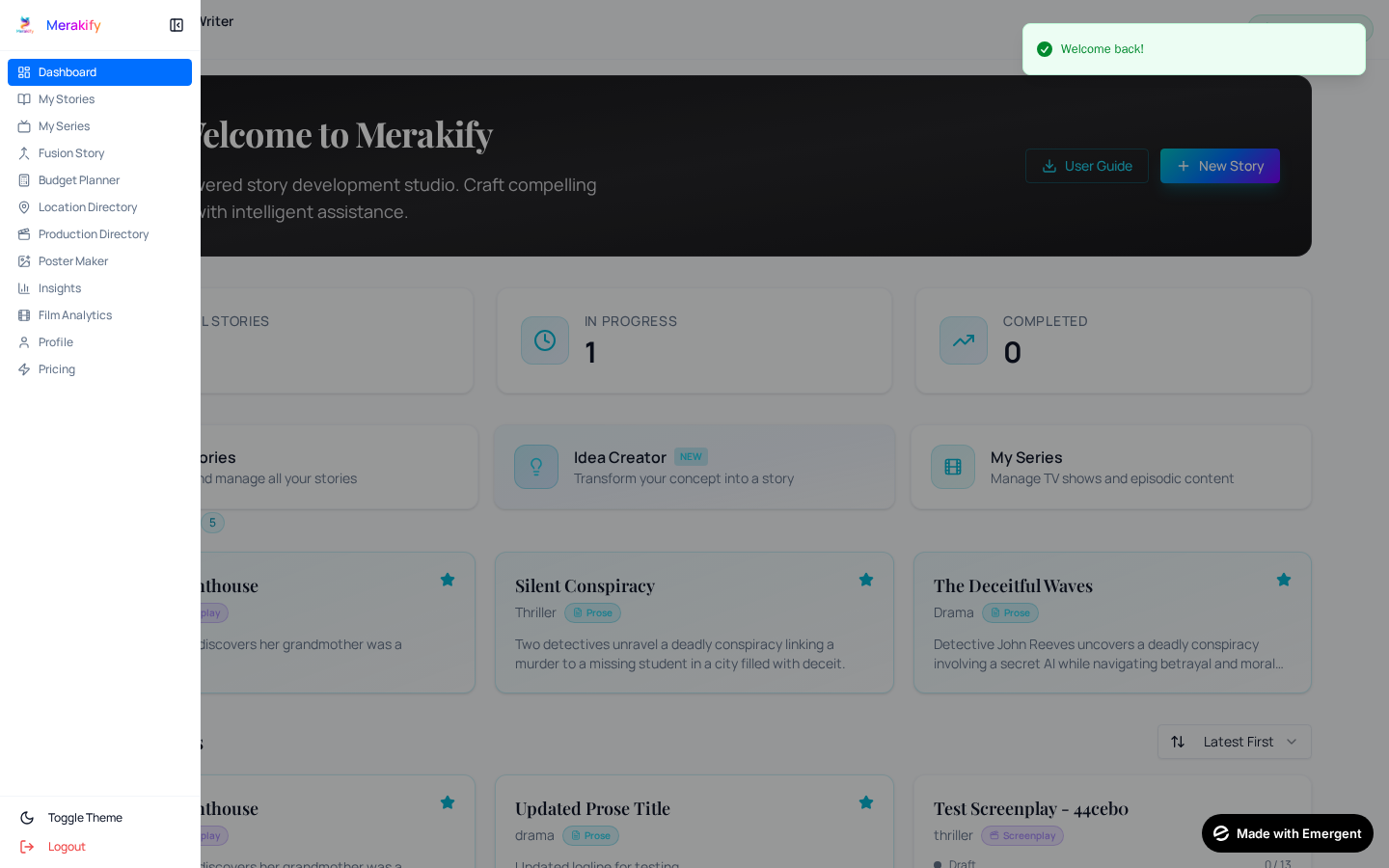
Merakify Dashboard

The Dashboard is your command center for all creative work. It provides an at-a-glance view of your stories, quick access to frequently used features, and intelligent shortcuts to jump back into your work.

Dashboard Components

Story Statistics

Track total stories, works in progress, completed projects, and favorites at a glance. See your creative portfolio grow.

Quick Actions

One-click access to New Story, Idea Creator, My Series, User Guide, Fusion Story, Budget Planner, and Location Directory.

Recent Stories

Your most recently accessed stories appear here for quick continuation. Never lose track of where you left off.

Favorites

Stories you've starred for priority access. Mark your most important projects for quick reference.

Navigation

The sidebar provides access to all major sections:

  • Dashboard: Overview and quick actions
  • My Stories: All your stories in a filterable list
  • Series: Organize stories into series or franchises
  • Budget Planner: Standalone budget planning tool
  • Locations: Location scouting directory
  • Poster Maker: AI poster generation

For Writers

  • Keep all projects organized in one place
  • Never lose track of story ideas
  • Quick access to current focus projects

For Producers

  • Review entire content library quickly
  • Track development status of all projects
  • Monitor team productivity

Story Tab

Story Workspace

The Story tab contains the core writing and content management tools. This is where your creative journey begins and where your story's foundation is built.

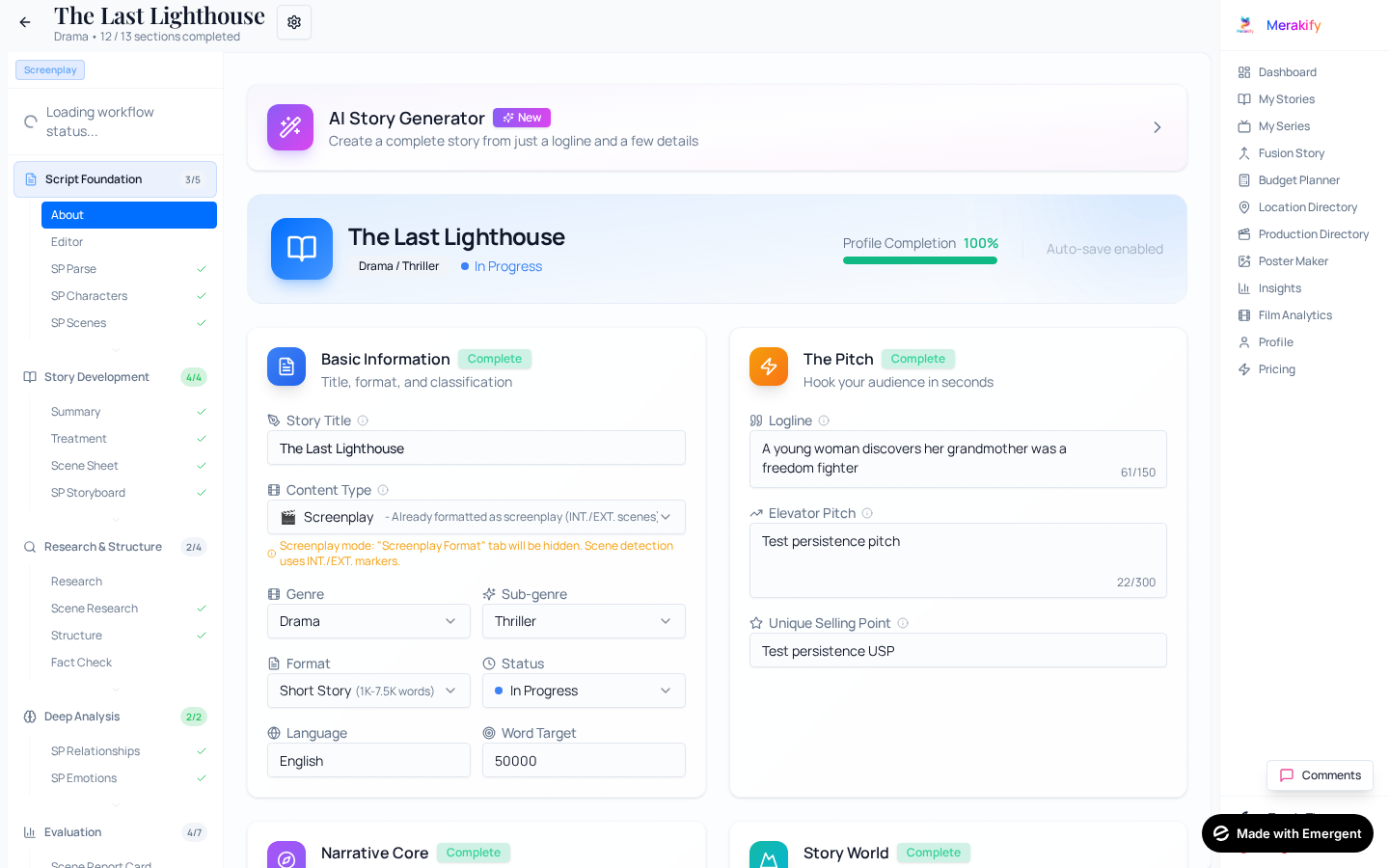
About

The About section stores essential metadata about your story that helps AI tools understand your creative intent and provides context for analysis.

Title & Logline: Your story's name and one-sentence pitch. The logline is crucial for AI analysis and helps focus your story's core conflict.
Synopsis: A detailed summary of your story. AI uses this to understand character motivations and plot structure.
Genre & Theme: Primary genre and thematic elements. Affects how AI evaluates commercial viability and suggests improvements.
Target Audience: Who is this story for? Helps AI tailor suggestions for your intended demographic.
Content Type: Screenplay or Prose mode - determines which tools and workflows are available.

Editor

The full-featured text editor is where you write your story. It adapts to your content type with appropriate formatting tools.

Rich Text Editing: Format text with bold, italic, headings, and lists. Full word processor functionality.
Auto-Save: Your work is automatically saved as you type. Never lose progress.
Word Count: Real-time word count tracking. See your progress as you write.
Chapter Management: For prose stories, organize content into chapters for better structure.

Scene Breakpoints — The Foundation of Everything

Scene Breakpoints are the most critical feature in the editor for prose writers. They mark where one scene ends and another begins in your story text using a simple-----(scene X→Y)----- marker.

Why are they essential? Scene breakpoints are the backbone that powers nearly every AI feature in Merakify. Without them, the platform cannot segment your story into individual scenes, and many features will remain locked or produce inferior results.

Features that depend on Scene Breakpoints:

  • Scene Breakdown: Generates detailed metadata for each scene (location, time, characters, mood)
  • Treatment: Creates a professional treatment document using scene structure
  • Scene Sheet: AI-generated detailed scene-by-scene analysis document
  • Screenplay Conversion: Converts each scene individually for accurate screenplay formatting
  • Storyboard: Generates visual storyboards based on scene boundaries
  • Emotional Analysis: Maps emotional arcs scene by scene
  • Production Planning: Scene breakpoints feed into scheduling, shot lists, and budgeting

How to add them: Use the Scene Breakpoint tool in the editor toolbar. Position your cursor between two scenes and click the breakpoint button. The editor will insert a visual divider. You can also manually type the marker pattern. Place breakpoints at every natural scene transition — changes in location, time, or major dramatic shift.

Pro Tip

Add scene breakpoints early in your writing process. Even rough scene divisions are better than none — you can always adjust them later. The more accurately you mark scene boundaries, the better every downstream AI feature will perform.

AI Writing Assistant

Your personal AI co-writer lives inside the editor. It's not a separate tool — it's deeply integrated into your writing workflow. Open the assistant panel from the editor toolbar or select text to reveal context-aware actions. The AI reads your full story context to provide relevant, character-aware suggestions.

How It Works

The AI Assistant appears as a panel on the right side of the editor. You can: (1) Select text in the editor to unlock context-aware tools like Enhance, Show Don't Tell, and Strengthen Dialogue — the AI uses your selection plus surrounding context. (2) Use the prompt bar to ask the AI anything about your story — brainstorm ideas, get feedback, or request specific edits. (3) Click quick-action buttons for common tasks like Continue Writing, Write Scene, or Fix Grammar. All AI-generated text can be inserted directly into your editor with one click.

Writing Help

Continue Writing: Stuck mid-paragraph? AI picks up exactly where you left off, matching your tone and style to keep the momentum going.
Write Scene: Describe the scene you need - location, characters, purpose, mood - and AI drafts a complete scene ready for your polish.
Beat Writer's Block: Get unstuck instantly with AI-generated prompts, story angles, and fresh ideas tailored to your current narrative.
Scene Transition: Create smooth, cinematic transitions between scenes that maintain narrative flow and reader engagement.

Text Improvement

Enhance Writing: Select any passage and AI elevates the prose - tighter sentences, stronger verbs, more evocative imagery.
Show Don't Tell: Transforms flat 'telling' passages into vivid 'showing' scenes with sensory details and character actions.
Add Emotion: Deepen the emotional resonance of any passage. AI layers in internal thoughts, body language, and atmosphere.
Fix Grammar: Clean up grammar, punctuation, and style issues while preserving your unique voice.

Dialogue & Characters

Write Dialogue: Generate natural, character-specific dialogue for any situation. Specify characters, context, and emotional tone.
Strengthen Dialogue: Select weak dialogue and AI sharpens it - adds subtext, conflict, and distinct character voices.
Develop Character: Deepen character psychology - AI expands backstory, motivations, and inner contradictions.
Create Conflict: Inject meaningful tension into any scene. AI suggests interpersonal, internal, or situational conflicts.

Story & Analysis

Suggest Endings: Explore multiple ending possibilities - AI generates satisfying, surprising, and thematically resonant conclusions.
Improve Pacing: AI analyzes rhythm and flow, identifying sections that drag or rush, with specific fix suggestions.
Find Plot Holes: Comprehensive consistency check - AI catches timeline errors, character contradictions, and logic gaps.
Enhance Descriptions: Transform bland settings into immersive worlds with vivid sensory details and atmospheric writing.

Free-Form AI Chat

Ask AI Anything: Open-ended conversation with AI about your story. Brainstorm plot ideas, discuss character motivations, or get feedback on any creative decision - all within your story's context.

Pro Tip

Select text in the editor to unlock context-aware tools like Enhance, Show Don't Tell, and Strengthen Dialogue. The AI uses your selected passage plus surrounding story context for the most relevant suggestions.

Research Assistant

An AI-powered research tool that helps you find information without leaving your writing environment.

Web Search Integration: Search the web for facts, historical details, or location information directly from your workspace.
Context-Aware Queries: AI understands your story context and provides relevant results.
Save Research Notes: Bookmark important findings for later reference.

Scene Research

Get detailed background research for specific scenes to add authenticity and depth to your writing.

Location Details: Research real-world locations - culture, customs, language, architecture, and local color.
Time Period Research: Historical accuracy for period pieces - fashion, technology, social norms, and events.
Technical Accuracy: Research procedures, professions, and technical details to make scenes believable.
Emotional Context: Understand the emotional landscape of specific situations for authentic character reactions.

Summary

AI-generated anonymized summary of your story that can be shared without revealing key plot twists or spoilers.

Spoiler-Free Overview: A summary that describes your story's premise without giving away the ending.
Shareable Format: Perfect for pitch meetings, query letters, or sharing with potential collaborators.
AI-Powered: Uses advanced language models to identify and protect spoilers while maintaining narrative clarity.

Structure

Analyze your story against established narrative frameworks to understand its structural strengths and weaknesses.

Three-Act Structure: Classic setup-confrontation-resolution analysis showing how your story fits the traditional model.
Hero's Journey: Joseph Campbell's monomyth structure - 12 stages from Ordinary World to Return with the Elixir.
Save the Cat: Blake Snyder's 15 beats - from Opening Image to Final Image, perfect for commercial screenplays.
Comparison View: See how your story maps to each framework and identify gaps in your narrative structure.

For Writers

  • All writing tools in one place
  • AI research without leaving the editor
  • Understand your story's structure

For Producers

  • Quick structural assessment
  • Shareable anonymized summaries
  • Evaluate narrative foundation

Scene-Based Tab
Scene-Based View

The Scene-Based tab transforms your story into visual components. For screenplays, it parses your script into structured data. For prose, it uses AI to generate scene breakdowns. This is essential for production planning.

SP Parse (Screenplay Mode)

The entry point for screenplay workflows. Parse your screenplay PDF or pasted content to extract all structural elements automatically.

PDF Upload: Upload screenplay PDFs in standard format. The parser handles most professional formats.
Scene Detection: Automatically identifies scene headers (INT/EXT), locations, and time of day.
Character Extraction: Identifies all speaking characters from dialogue cues.
Dialogue Parsing: Extracts dialogue, parentheticals, and action lines for each scene.
Scene Statistics: Word counts, page estimates, and character presence for each scene.

Pro Tip

For best results, ensure your screenplay follows standard formatting conventions with clearly marked scene headers (INT./EXT.) and character names in CAPS before dialogue.

Characters

View and manage all characters extracted from your story. This is the foundation for actors, relationships, and production planning.

Character List: All characters with dialogue counts, scene appearances, and role importance.
Character Details: View physical descriptions, personality traits, and key relationships for each character.
Role Classification: Automatic classification as Lead, Supporting, or Minor based on presence and dialogue.
Character Approval: Review AI-extracted characters and approve them for use in production tools.
Sync to Actors: Approved characters can be synced to the Actors Hub for casting.

Scenes

Visual scene cards showing your entire story structure at a glance. Each card is a mini-dashboard for one scene, giving you instant visibility into the building blocks of your narrative.

Scene Cards: Each scene is displayed as a visual card showing its number, location (INT./EXT.), time of day, and a list of characters present. For screenplays, scene cards are generated from SP Parse. For prose, they come from Scene Breakdown (which requires scene breakpoints in the editor).
Scene Content Preview: Click any scene card to expand and see the full scene content — dialogue, action lines, and descriptions. Quickly review any part of your story without scrolling through the entire text.
Character Presence: Each card shows character avatars or names for every character in that scene. Instantly see who appears where — essential for scheduling and continuity.
Scene Metadata: Word count, estimated page count, estimated screen time, and mood/tone tags for each scene. Helps producers assess which scenes are most resource-intensive.
Edit Scene Details: Modify scene location, time, character list, and descriptions directly from the card. Changes reflect across all production tools.
Scene Navigation: Click any scene card to jump to that scene's position in the editor. Navigate your story by structure rather than scrolling.

Pro Tip

Scene cards are the visual backbone of your story's production pipeline. The data from these cards feeds into scheduling, shot lists, location management, and budgeting. Keep them accurate and complete for the best production planning experience.

Scene Sheet

The Scene Sheet is a downloadable, AI-generated document that provides a detailed narrative breakdown of every scene in your story. Think of it as a professional script supervisor's reference document — one or two rich paragraphs per scene covering setting, action, character dynamics, and narrative purpose.

Prerequisite

Scene Sheet requires Scene Breakdown (prose mode) or SP Parse (screenplay mode) to be completed first. The button will appear locked until the prerequisite is met.

AI Scene Analysis: Click 'Generate Scene Sheet' and AI analyzes your full story content against the scene structure. For large screenplays (100+ scenes), generation runs in the background with a live progress bar — no need to wait on the page.
Characters Per Scene: Each scene entry lists all characters present as visual tags, making it easy to track character appearances across the story at a glance.
Detailed Descriptions: Each scene gets 1-2 paragraphs covering: physical setting and atmosphere, key actions and events, character dynamics and emotional states, pivotal dialogue highlights, narrative purpose, and sensory details.
Expandable Scene Cards: In the app, each scene appears as an expandable card. The first few scenes are open by default — click any scene header to expand or collapse its details.
PDF Export: Download the Scene Sheet as a professionally formatted PDF. Includes story title as heading, page numbers, and 'Made with Merakify' in the footer. Supports all languages including Kannada, Hindi, Tamil, Telugu, and more.
DOCX Export: Download as a Microsoft Word document for editing, sharing with collaborators, or including in production binders. Same professional formatting with footer and page numbers.
Regenerate Anytime: Updated your story? Click 'Regenerate' to get a fresh scene sheet reflecting your latest changes.

Pro Tip

The Scene Sheet is an excellent document to share with your director, cinematographer, or production designer before pre-production begins. It gives everyone a scene-by-scene understanding of the story without reading the full script. Export as PDF for a polished, shareable document.

Relationships

AI-analyzed character relationships showing how characters connect and interact throughout your story.

Relationship Map: Visual network diagram showing connections between all characters.
Relationship Types: Identifies romantic, familial, professional, and antagonistic relationships.
Relationship Strength: Shows how strong each connection is based on scene interactions.
Dynamic Analysis: See how relationships evolve from beginning to end of your story.

SP Emotions

Deep emotional intelligence analysis of your story. Four specialized AI tools that examine your screenplay from different creative perspectives — giving you insights no table read can provide.

Emotional Blueprint

Emotional Arc Trajectory: Interactive chart showing the emotional intensity across your story. Hover over data points to see exactly what happens in each scene that drives the emotion to that level.
Audience Pulse Map: Tension-level graph showing where audiences will be gripped, relaxed, or at risk of disengaging — with scene-specific explanations.
Scene-by-Scene Emotions: Every scene analyzed with primary emotion, intensity level, and emotional notes.
Overall Emotional Score: A single score (1-10) summarizing how effectively your story uses emotional storytelling, with strengths and weaknesses.

Director's Playbook

Pivotal Moments: AI identifies the 8-12 most important emotional shifts in your story and provides directorial notes for each — including sensory palette, music cues, and the 'silent beat'.
Audience Engagement Map: Chart tracking audience tension throughout the story with context-rich tooltips explaining what drives engagement at each point.
Sensory Palettes: For each pivotal scene, get color palettes, sound design suggestions, and visual direction that amplify the emotional impact.

Writer's Mirror

Subconscious Themes: AI reveals the hidden themes you've woven into your story without realizing — the deeper truths your writing is exploring.
Character Chemistry: Analysis of relationship dynamics between characters — who has real chemistry on the page and where connections fall flat.
Emotional Undercurrent: The hidden emotional layer running beneath your plot — what your story feels like vs. what it's about on the surface.
Voice Profile: AI analyzes your unique writing voice — rhythm, word choice patterns, and stylistic signatures that make your writing distinctly yours.

AI Story Doctor — Magnified View

Predictive Audience Analytics: AI predicts how audiences will react — retention curve showing where viewers stay engaged or tune out, viral moments worth sharing, and walkout risks with fixes.
Pacing & Rhythm Map: Tempo chart showing the story's rhythm over time — where it races, where it breathes, and where pacing issues need attention. Includes scene-by-scene rhythm breakdown.
Dialogue Strength Test: Deep analysis of dialogue quality — authenticity, subtext, memorability, and character voice distinctness. Highlights the strongest lines and weakest moments with specific fix suggestions.

Pro Tip

Run the Emotional Blueprint first — it generates the scene-level emotion data that powers the Director's Playbook, Writer's Mirror, and Story Doctor. For screenplays, all scenes are analyzed with their actual content and dialogue.

Screenplay (Prose Mode)

For prose stories, convert your narrative into professional screenplay format ready for production.

Format Conversion: AI converts prose narrative into proper screenplay format with scene headers, action, and dialogue.
Industry Standard: Output follows industry-standard screenplay conventions.
Export Ready: Generated screenplay can be exported as PDF or Final Draft format.

Screenplay AI Assistant & Dialogue Improviser

A powerful AI toolkit built specifically for screenwriters. Access it from the screenplay viewer toolbar — look for the AI Assistant icon after generating or viewing your screenplay. Select any dialogue or action text in the screenplay to unlock context-aware tools. The assistant understands your full script, characters, and story arc to provide relevant suggestions.

How to Access

For Prose writers: Generate a screenplay from your prose (Story Development → Screenplay), then open the screenplay viewer. The AI Assistant panel appears on the right side. For Screenplay writers: After SP Parse, view your screenplay in the screenplay viewer. Select any text to see context-aware options, or use the toolbar buttons for specific tools like Expert Dialogue Writer and Continuity Check.

Dialogue Tools

Enhance Dialogue: Select any dialogue and AI rewrites it to be sharper, more natural, and more impactful - while preserving meaning and character voice.
Change Emotion: Transform the emotional tone of any dialogue instantly. Choose from Funny, Sad, Angry, Sarcastic, Romantic, Mysterious, Fearful, or Confident.
Alternative Versions: Get 5 different variations of the same dialogue, each with a different emotional flavor - perfect for exploring creative options before committing.
Add Subtext: Layer hidden meaning beneath the surface of dialogue. Characters say one thing but mean another - the hallmark of great screenwriting.
Match Character Voice: Select a character and AI adjusts the dialogue to match their established personality, speaking patterns, and vocabulary.

Expert Dialogue Writer

Context-Driven Dialogue: Describe a scene situation and AI generates complete, production-ready dialogue. Set the scene context, speaking characters, emotional tone, and get multiple versions to choose from.
Multi-Language Support: Write dialogue in English, Hindi, Hinglish, Tamil, Telugu, Bengali, Marathi, Punjabi, Kannada, Malayalam, or Urdu - ideal for regional cinema.
Style Selection: Choose your dialogue style: Cinematic (sharp, every word matters), Theatrical (dramatic speeches), Naturalistic (real speech), Poetic (lyrical), Noir (hard-boiled), or Witty (fast-paced banter).
Multiple Variations: Generate up to 5 variations with AI-recommended best version highlighted. Each variation takes a different creative approach while staying true to your characters.

Continuity & Flow

Emotion Continuity Check: AI verifies that emotions flow naturally across scenes - catches jarring tonal shifts that could pull audiences out of the story.
Character Consistency: Ensures each character maintains a consistent voice throughout. Flags lines where a character sounds 'off' from their established personality.
Dialogue Pacing: Analyzes the rhythm of dialogue exchanges - identifies scenes that move too fast, too slow, or need better beat placement.

Scene Structure

Cliffhanger Break: Find the perfect dramatic moment to end a scene. AI identifies the point of maximum tension for compelling scene breaks.
Scene Beats: Break any scene into its dramatic beats - setup, escalation, turning point, climax. Understand the micro-structure of each scene.
Build Tension: AI escalates conflict progressively within selected text, adding stakes and urgency to keep audiences on the edge.

Action Lines & Visuals

Enhance Action Lines: Transform flat action descriptions into vivid, visual writing that reads like cinema - every line paints a picture on screen.
Add Parentheticals: AI suggests actor directions and emotional beats for dialogue delivery, adding nuance without overwriting.
Visual Storytelling: Strengthen 'show don't tell' in your screenplay. AI adds visual details, character actions, and environmental cues.

Script Analysis

Dialogue Density: Analyze the talk-to-action ratio in your screenplay. Too dialogue-heavy? Too much action? Find the right balance for your genre.
Character Arc Check: Track how each character grows through their dialogue. AI identifies where arcs stall or skip critical development moments.
Conflict Analysis: Identify, measure, and strengthen conflicts in your screenplay - interpersonal, internal, and situational.

AI Chat

Screenplay Expert Chat: Ask AI anything about your screenplay - dialogue craft, structure, formatting conventions, or creative direction. It understands your full script context for relevant, actionable advice.

Pro Tip

Select dialogue text in the screenplay viewer to unlock context-aware tools. The Expert Dialogue Writer is especially powerful - describe the situation naturally and AI writes production-ready dialogue in your chosen language and style.

Storyboard

AI-generated storyboard images for visualizing your scenes before shooting.

Scene Visualization: Generate AI images representing each scene's key moments.
Character Introduction: Visual representations of main characters for casting reference.
Shot Composition: Visual suggestions for camera angles and framing.
Export Storyboard: Download complete storyboard as PDF for sharing with production team.

For Writers

  • Visualize story structure at a glance
  • Identify pacing issues easily
  • Track emotional arc of your narrative

For Producers

  • Quick scene-by-scene assessment
  • Identify production-heavy scenes
  • Visual storyboard for planning

Actors Tab

Actors Hub

The Actors Hub bridges writing and production. Characters from your screenplay automatically sync to become castable roles, complete with all information a casting director needs.

Cast Management

Comprehensive casting database for your production. Track characters, assigned actors, and casting status.

Character Roster: All characters from your story with role type, scene count, and dialogue amount.
Actor Assignment: Assign real actors to character roles. Add photos, contact info, and availability.
Casting Status: Track casting progress - Open, In Negotiation, Confirmed, Alternate.
Character Details: Physical requirements, age range, and special skills needed for each role.

Look Tests

Revolutionary AI-powered visualization that shows how potential actors might look in character.

Actor Headshot Upload: Upload photos of actors you're considering for roles.
AI Face Swap: See how actors would look as your characters using advanced AI face-swapping.
Comparison Gallery: Compare multiple actors for the same role side by side.
Stakeholder Sharing: Share look tests with producers and directors for casting decisions.

Pro Tip

Look Tests work best with clear, front-facing headshots. Upload multiple photos of each actor candidate to see them in different character contexts.

Schedule

Actor-centric scheduling showing when each cast member is needed on set.

Availability Tracking: Mark actor availability windows and conflicts.
Scene Requirements: See which scenes require which actors for scheduling efficiency.
Conflict Detection: Automatic alerts when actor schedules conflict with shooting days.

Call Sheets

Generate professional call sheets with all details crew and cast need for each shooting day.

Daily Call Sheets: Industry-standard call sheets with call times, locations, and contact info.
Scene Breakdown: Which scenes are shooting, which characters are needed, and timing.
Export Options: Download as PDF or Excel for distribution to production team.

Actor Sheets

Individual character breakdown sheets for each actor with all their scenes and dialogue.

Character Summary: All information an actor needs about their character in one document.
Scene List: Every scene the character appears in with context and dialogue.
Relationship Notes: Key relationships and dynamics with other characters.
Export Individual Sheets: Generate PDFs for each actor to prepare their role.

For Writers

  • See characters come to life visually
  • Understand how descriptions translate
  • Reference for writing dialogue

For Producers

  • Streamlined casting workflow
  • All character data centralized
  • Professional call sheet generation

Production Tab

Complete pre-production planning tools integrated directly into the writing environment. Plan locations, schedule shoots, manage crew, and track budget without leaving Merakify.

SP Locations

Location management for all your story's settings. Track scouted locations, permits, and contacts.

Location Database: All locations from your screenplay organized by scene requirements.
Scouting Notes: Add photos, addresses, and notes from location scouts.
Permit Tracking: Track permit requirements and application status for each location.
Contact Management: Store location manager contacts and rental information.
Cost Estimates: Track location rental costs and requirements.

Scheduler

Production scheduling tool that helps create shooting schedules based on your scenes.

Day Planning: Organize scenes into shooting days based on location, cast, and efficiency.
Scene Grouping: Group scenes by location to minimize company moves.
Time Estimates: AI-suggested shooting times based on scene complexity.
Calendar View: Visual calendar showing the entire production schedule.

Shot Lists

Detailed shot-by-shot planning for each scene in your production.

Shot Breakdown: Plan individual shots for each scene - wide, medium, close-up, inserts.
Camera Notes: Specify camera movement, lens choices, and technical requirements.
Shot Numbering: Industry-standard shot numbering system.
Export Shot Lists: Generate PDF shot lists for the director and DP.

Crew

Crew management for your production team.

Department Organization: Organize crew by department - Camera, Sound, Art, etc.
Contact Database: Store all crew contact information in one place.
Role Assignment: Assign crew members to specific roles and departments.
Rate Tracking: Track day rates and payment information.

Availability

Track crew availability and identify scheduling conflicts.

Availability Calendar: Visual calendar showing when each crew member is available.
Conflict Detection: Automatic alerts for scheduling conflicts.
Multi-Project View: Track crew across multiple productions.

Budget

Comprehensive budget planning for your production.

Budget Categories: Above-the-line, below-the-line, post-production, and contingency.
Line Items: Detailed line-item budgeting with quantities and rates.
Currency Support: Budget in INR, USD, EUR, or other currencies.
Export Reports: Generate budget reports as PDF or Excel.

Equipment

Production equipment planning and rental management.

Equipment Database: Searchable database of cameras, lenses, lighting, and grip equipment.
Rental Costs: Daily and weekly rental rates for budget planning.
Equipment Lists: Create equipment lists for each shooting day.
Vendor Contacts: Store rental house contacts and preferences.

Pitch Deck

Generate professional pitch materials for investors and studios.

Auto-Generated Slides: AI creates pitch deck slides from your story and production data.
Comparable Analysis: Include comparable films and market analysis.
Budget Summary: Include high-level budget overview for investors.
Export Formats: Download as PDF or PowerPoint.

For Writers

  • Understand production realities
  • Create professional pitch materials
  • Visualize your story's production needs

For Producers

  • All pre-production in one place
  • Seamless script-to-production workflow
  • Professional export formats

Analysis Tab
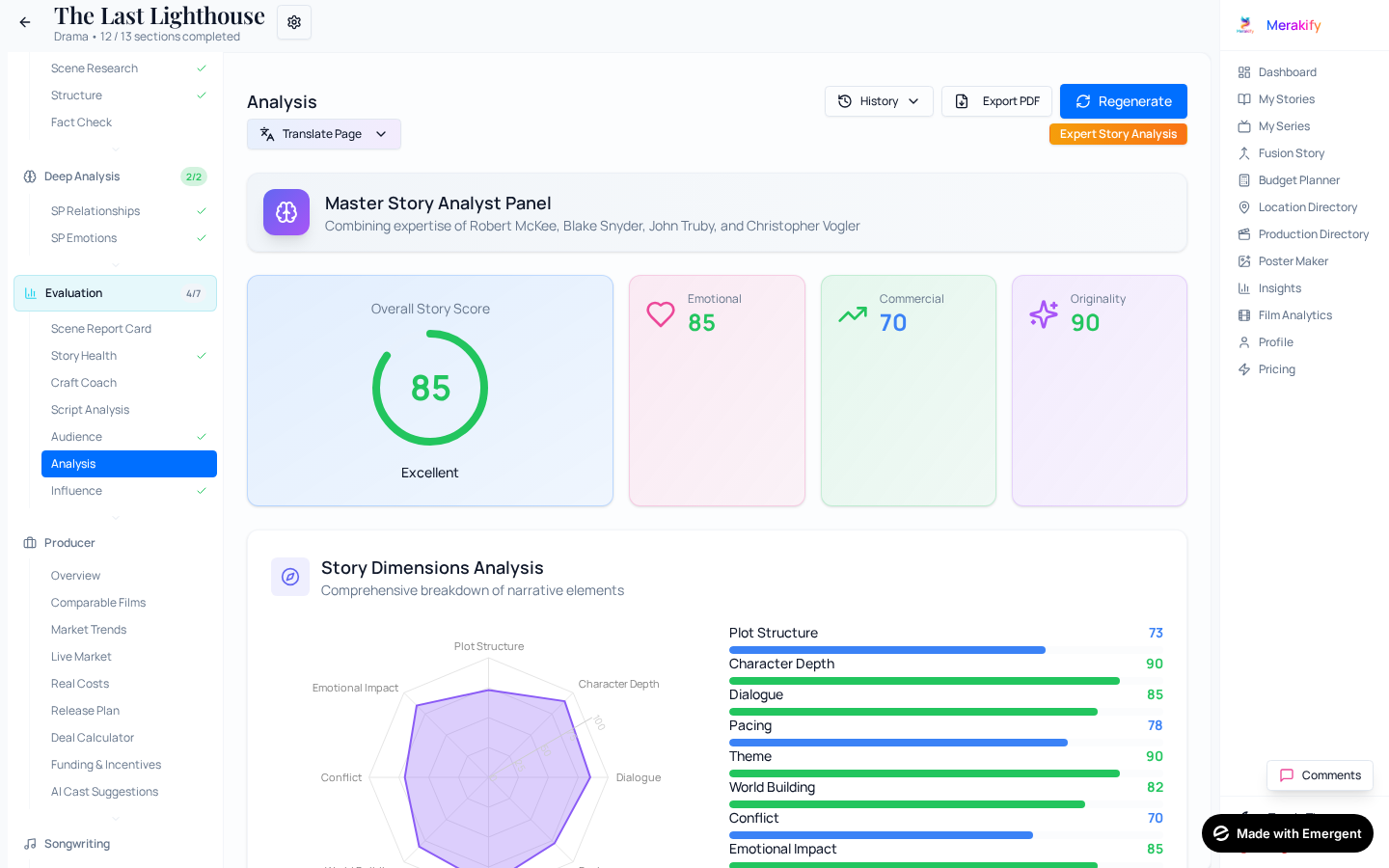
Analysis Suite

Professional-level script evaluation using advanced AI. These tools help identify strengths and weaknesses before investing significant time or money in development.

Story Craft Coach

Master 25+ professional storytelling techniques with our AI-powered coach. Get specific, actionable insights on craft elements that separate amateur from professional writing.

Quick Analysis: 30-second analysis giving overall Narrative Craft Score (1-10), category breakdown, and top strengths/improvements.
Deep Analysis: 2-3 minute comprehensive analysis with technique-by-technique scores, scene-level examples, and action plan.
25+ Techniques: Show Don't Tell, Chekhov's Gun, Dialogue Subtext, Dramatic Irony, Ticking Clock, and more.
Genre-Specific: Analysis adapts to your genre - thriller, horror, comedy, romance, drama techniques.
Technique Drill-Down: For weak techniques, access mini-lessons, film examples, and practice exercises.

Pro Tip

Use the "Learn & Improve" button on weak techniques to access detailed lessons with examples from films like The Godfather, Parasite, 3 Idiots, and more.

Producer Panel

Data-driven analysis for production decisions, including comparable films and deal planning.

Comparable Films: AI identifies 5-8 similar films with box office performance and budget data.
Distribution Deal Calculator: Real-world P&L calculator for producers — input deal terms, get instant profit/loss, breakeven & ROI. See the dedicated Deal Calculator section below.
ROI Projections: Estimated returns based on comparable performance.
Risk Assessment: Identifies production and market risks.

Script Analysis Suite

Five comprehensive evaluation tools for professional script assessment:

1Movie Readiness Score

Evaluates production readiness across 7 dimensions: Structure, Character Development, Dialogue Quality, Visual Storytelling, Commercial Viability, Production Feasibility, and Script Length. Returns an overall score with interpretation.

2AI Story Doctor (Script Analysis)

Professional script consultation analyzing structure, character arcs, emotional stakes, and dialogue effectiveness. Returns diagnosis with specific issues and recommended fixes. (Note: A separate, in-depth Story Doctor with audience analytics and pacing maps is available in SP Emotions.)

3Plot Hole Detector

Finds logical inconsistencies, timeline gaps, character motivation issues, and unresolved plot threads. Returns coherence score with severity-rated issues.

4Story Predictability Score

Measures how surprising your story is. Identifies predictable elements and suggests ways to subvert expectations while maintaining coherence.

5Story Logic Engine (Continuity & Logic Checker)

AI scans your entire story or screenplay for logical consistency - the kind of errors that pull audiences out of the experience. Think of it as your personal continuity supervisor.

What it detects:

Timeline Mistakes: Events in impossible order, travel time violations, day/night contradictions, and age math errors.
Physical Continuity Breaks: Character injured in Scene 3 but running in Scene 12? Objects appearing or disappearing? The engine catches it all.
Character Knowledge Errors: Characters knowing information they were never told, or forgetting things they should remember.
Forgotten Plot Threads: Subplots set up but never resolved, characters introduced then abandoned, promises never fulfilled.
Impossible Events: Actions that violate the story's own rules, unrealistic feats without genre justification.
Emotional Logic Breaks: Reactions that don't match event severity, sudden personality shifts, missing expected emotional responses.
Dialogue Contradictions: Characters stating facts that conflict with earlier dialogue, conflicting backstory details.

Pro Tip

The Logic Engine compares scenes against each other to find cross-scene inconsistencies that are nearly impossible to catch during normal editing. Run it after your second draft for maximum value.

Audience Analysis

Understand your potential audience and how to reach them.

Demographic Analysis: Primary and secondary audience demographics.
Appeal Factors: What elements will attract your target audience.
Marketing Hooks: Key selling points for promotional materials.

Story Treatment

Generate a professional treatment document from your story.

Format Options: Short treatment (1-2 pages) or detailed treatment (5-10 pages).
Industry Standard: Follows industry conventions for treatment formatting.
Export Ready: Download as PDF for submission to studios or producers.

Creative Influence

Analyze your story's influences and originality.

Influence Detection: AI identifies films and stories that share thematic or structural similarities.
Originality Score: How unique is your story compared to existing works.
AI Detection: Checks if content appears AI-generated (useful for authenticity).

For Writers

  • Professional feedback instantly
  • Learn from analysis to improve
  • Objective quality assessment

For Producers

  • Data-driven script evaluation
  • Assess quality before investment
  • Market potential analysis

Organize Tab

Visual planning tools to organize your story elements. Map character relationships, arrange scenes, and create comprehensive story documentation.

Character Map

Interactive visual diagram showing all character relationships in your story.

Network Visualization: Characters as nodes, relationships as connecting lines.
Relationship Types: Color-coded lines for different relationship types (family, romantic, conflict).
Interactive Editing: Click to select characters, drag to reposition, add new relationships.
Relationship Details: Click connections to see relationship descriptions and key scenes.

Pro Tip

Use the Character Map to identify isolated characters who might need more connections, or to spot relationship clusters that could create interesting conflicts.

Scene Board

Kanban-style board for organizing and rearranging your scenes visually.

Visual Scene Cards: Each scene as a card showing key metadata at a glance.
Drag & Drop: Rearrange scenes by dragging cards to new positions.
Filtering: Filter scenes by location, characters, or emotional tone.
Color Coding: Scenes color-coded by act, location, or custom tags.

Story Bible

Comprehensive reference document containing all information about your story world.

Auto-Generated: AI compiles information from your story into a structured bible.
Character Profiles: Complete profiles for all major and supporting characters.
World Building: Locations, timeline, rules, and lore of your story world.
Plot Summary: Act-by-act breakdown of your story's plot.
Export: Download as PDF for reference or sharing with collaborators.

For Writers

  • Visual story organization
  • Track all story elements
  • Comprehensive reference bible

For Producers

  • Quick story structure overview
  • Character relationship clarity
  • Complete story documentation

Tools Tab

Productivity tools to track your writing progress, manage versions, and create visual inspiration for your story.

Writing Progress

Track your writing productivity over time with detailed statistics.

Word Count Tracking: Daily, weekly, and monthly word count statistics.
Writing Streaks: Track consecutive writing days to build habits.
Goal Setting: Set word count targets and track progress toward them.
Session History: View history of all writing sessions with timestamps.

Version History

Full version control for your story, allowing you to save snapshots and restore previous versions.

Save Versions: Create named snapshots of your story at any point.
Version Comparison: Compare different versions to see what changed.
Restore: Restore any previous version instantly.
Auto-Versioning: System automatically creates versions at key milestones.

Pro Tip

Save a version before making major structural changes. If the changes don't work, you can easily restore to your previous state.

Mood Board

Visual inspiration board to capture the look and feel of your story.

Image Collection: Upload or search for images that capture your story's aesthetic.
Color Palettes: Define color palettes for different moods or locations.
Reference Images: Collect character, location, and costume references.
Shareable: Export mood board for sharing with production team.

For Writers

  • Track writing productivity
  • Never lose work with versioning
  • Visual inspiration for creativity

For Producers

  • Monitor writing progress
  • Track revision history
  • Visual references for production

Songwriting

AI-powered songwriting module with a sophisticated Two-Pass Critic Engine. Write original songs for your film or series — lyrics generated with emotional resonance, sensory imagery, and cultural authenticity across Indian languages.

Two-Pass Critic Engine

Merakify's songwriting goes far beyond basic AI lyrics. It uses a two-pass generation process where a first AI pass writes the lyrics, then a second "Harsh Critic" pass rewrites weak lines, catches cliches, and enforces poetic quality.

Pass 1: Generation: AI writes lyrics based on your mood, theme, genre, and character context. Understands film situations and emotional beats.
Pass 2: Harsh Critic: A second AI pass acts as an unforgiving lyric critic — catches generic phrases, abstract emotion-naming, abandoned metaphors, and uniform line lengths. Weak lines are rewritten with specific sensory images.
Banned Cliches: A curated dictionary of overused phrases (Hindi, Kannada, Tamil, Telugu, Bengali) that the critic explicitly forbids — forcing original imagery every time.
Anti-Pattern Rewrites: The critic is trained with side-by-side BAD-to-GOOD examples showing how to transform generic AI lyrics into master-level writing.
Critic Badge: When the critic pass is applied, a green badge appears on the lyrics. Each section shows critic notes explaining what was improved.

Song Configuration

Mood & Theme: Set the emotional tone — romantic, melancholic, celebratory, rebellious, spiritual, and more.
Genre Selection: Bollywood, Indie, Ghazal, Folk, Sufi, Pop, Rock — genre affects rhythm, vocabulary, and structure.
Language & Blend: Write in Hindi, Hindustani (Urdu-Hindi blend), Kannada, Tamil, Telugu, Bengali, Punjabi, and more. The Hindustani blend produces natural code-mixed lyrics.
Lyricist DNA: 29 legendary lyricist profiles across 12 languages. Choose a lyricist style (e.g., Gulzar, Sahir, Shailendra) and AI captures their signature — metaphor density, vocabulary, emotional approach.
Rhyme Preservation: The critic validates that rhymes carry meaning (not just sound) and preserves intentional rhyme schemes across verses.

Quality Checks

Body Test (Emotional Resonance): Each lyric is tested against the 'body test' — does it make you feel something physical? Goosebumps, a lump in the throat, a smile. Lyrics that pass are genuinely moving.
Rhyme-Meaning Validator: Ensures rhymes aren't forced — every rhyming word must earn its place through meaning, not just sound matching.
Cliche Detection: Real-time detection of tired phrases with specific replacement suggestions.
Sensory Image Check: Verifies lyrics contain concrete sensory details — cold fingertip, empty plate, wind whispering a name — rather than abstract emotional labels.

Music Integration

Suno AI Integration: Generate actual music tracks from your lyrics using Suno AI. Listen to your songs come to life.
Genius API: Research existing songs, find lyrical references, and study song structures from the world's largest lyrics database.
Audio Playback: Play generated tracks directly in the workspace. Save favorites to your song library.

Pro Tip

The Lyricist DNA feature is incredibly powerful. Instead of generic lyrics, choose a specific lyricist profile (like Gulzar for metaphor-rich writing or Javed Akhtar for conversational depth) and watch the AI capture their signature style while creating something original.

For Writers

  • Write film songs that feel handcrafted
  • Explore 29 legendary lyricist styles
  • Get lyrics in 12+ Indian languages

For Producers

  • Rapid song prototyping for pitches
  • Generate music demos with Suno AI
  • Evaluate song potential for films

Distribution Deal Calculator

A real-world P&L calculator built for producers. Input actual deal terms — distribution commissions, revenue shares, tax rates — and get instant profit/loss verdicts, breakeven analysis, and ROI calculations. No AI-generated guesswork, just hard numbers.

Revenue Streams

Theatrical MG: Minimum guarantee from theatrical distribution. Input the actual deal amount from your distributor.
OTT Rights: Revenue from streaming platform deals — Netflix, Amazon, JioCinema, Disney+, etc.
Satellite TV: Television broadcast rights revenue.
Music Rights: Revenue from music label deals and streaming royalties.
Overseas: International distribution revenue.
Ancillary: Brand integrations, merchandising, and other revenue streams.

Deal Terms

Distribution Commission (%): The distributor's cut — typically 20-30%. This is deducted from gross revenue before your share.
Producer's Theatrical Share (%): Your share of theatrical revenue after the distributor takes their commission.
Tax/GST (%): Applicable tax rate on revenue — varies by territory and deal structure.
Production Budget: Your total production cost — the number you need to recover to break even.
P&A Budget: Prints & Advertising costs for theatrical release.

Analysis Output

P&L Verdict: Clear PROFITABLE / LOSS / BREAKEVEN verdict based on your actual numbers.
ROI %: Return on investment calculated from your production budget vs. net revenue.
Breakeven Analysis: Exact percentage of gross revenue needed to break even — shows how much risk you're carrying.
Revenue Waterfall Chart: Visual bar chart showing how gross revenue flows through distribution commission, taxes, and finally to producer's net.
Revenue & Cost Split Pies: Pie charts showing revenue stream breakdown and cost allocation.
Detailed P&L Statement: Full line-by-line profit & loss table — the kind you'd present to investors.

Preset Templates

Low-Budget Indie: Pre-filled terms for independent films with lower MGs and focused OTT strategy.
Mid-Budget Commercial: Standard commercial film deal structure with balanced revenue streams.
Big-Budget Star Vehicle: High-MG theatrical deal with full revenue waterfall for tentpole releases.
Save & Load Scenarios: Save your deal scenarios to MongoDB, load them later, compare multiple deal structures side by side.

Pro Tip

Use the Deal Calculator before signing distribution agreements. Input multiple scenarios — what if the distributor asks for 25% vs 30%? What if OTT drops by 20%? The breakeven analysis shows exactly how much buffer you have.

For Writers

  • Understand how deals actually work
  • Negotiate from an informed position
  • Know what your story is worth

For Producers

  • Real P&L before signing deals
  • Investor-ready financial models
  • Compare deal structures instantly

Scene Report Card

AI grades every scene in your story across 6 critical signals. Get a scene-by-scene quality assessment that tells you exactly which scenes are strong, which need work, and which are candidates for cutting. Handles screenplays with 200+ scenes via batch processing.

6 Quality Signals

Conflict: Does the scene contain meaningful conflict — interpersonal, internal, or situational? Scenes without conflict are passive and risk losing the audience.
New Information: Does the scene reveal something the audience didn't know before? Every scene should move the story forward with new plot or character information.
Character Arc: Does at least one character change, learn, or shift emotionally in this scene? Static characters make flat scenes.
Emotional Shift: Does the scene's emotional temperature change from beginning to end? A scene that starts and ends at the same emotional level feels stagnant.
Purpose: Why does this scene exist in the story? Scenes without a clear structural purpose (setup, escalation, climax, resolution) are candidates for removal.
Verdict: STRONG (keep as-is), NEEDS_WORK (has potential but needs revision), or CUT_CANDIDATE (doesn't earn its place).

How It Works

Batch Processing: For large screenplays (100+ scenes), analysis runs in batches of 15 scenes with live progress tracking. No timeout issues even with 200+ scenes.
Fix Suggestions: Every scene rated NEEDS_WORK or CUT_CANDIDATE comes with specific, actionable suggestions for improvement.
Scene Grades: Visual grade cards for each scene — green for STRONG, amber for NEEDS_WORK, red for CUT_CANDIDATE.
Aggregate Stats: See your story's overall health — percentage of strong scenes, scenes needing work, and cut candidates.

Pro Tip

Run the Scene Report Card after your second draft. It's especially powerful for identifying the "soft middle" problem — Act 2 scenes that feel necessary but aren't earning their place. If a scene has no conflict AND no new information, it's almost certainly a cut candidate.

For Writers

  • Identify weak scenes before feedback
  • Know exactly what each scene needs
  • Tighten your story systematically

For Producers

  • Quick script quality snapshot
  • Identify scenes needing rewrites
  • Assess script readiness for production

AI Cast Suggestions

AI-powered casting recommendations based on your characters' traits, the story's industry context, and actor availability. Get 3-5 actor suggestions per character with fit reasoning, recent filmography, fee ranges, and risk factors.

Industry-Locked Suggestions

Auto-Detect Industry: Merakify detects your story's film industry from metadata (Bollywood, Kannada, Tamil, Telugu, etc.) and suggests actors from that industry by default.
Scope Selector: Choose 'Industry Only' for hyper-relevant suggestions, 'Pan-India' for cross-industry options, or 'Global' for international casting.
Character-Aware: For screenplays, suggestions are based on parsed screenplay characters (not prose summaries) — ensuring accurate age, personality, and screen presence matching.

Per-Actor Details

Fit Reasoning: AI explains WHY each actor is a good match — screen presence, past roles, audience perception, and character alignment.
Recent Filmography: Last 3-5 films for each suggested actor with box office performance context.
Fee Range: Estimated fee range for each actor based on current market rates.
Risk Factor: Assessment of scheduling conflicts, market perception risks, and audience reception concerns.

Pro Tip

Extract and approve your characters in the Characters tab before running Cast Suggestions. The more character detail (age, personality, physical traits) you provide, the better the actor matches will be.

For Writers

  • Visualize actors in your roles
  • Understand casting realities
  • Write with actors in mind

For Producers

  • Quick casting shortlists
  • Fee estimation for budgeting
  • Risk-aware casting decisions

Documents Hub

Generate professional document packages from your story data. The Documents Hub consolidates all your work into polished, production-ready documents for writers, producers, and legal purposes.

Project Readiness Score

See at a glance how complete your project documentation is. The readiness score is calculated based on available story sections.

Writer Pack Score: Shows percentage completion based on Summary, Treatment, Characters, Scene Breakdown, and Story Bible.
Producer Pack Score: Shows percentage completion based on Budget, Schedule, Locations, Cast, and production data.
Missing Sections Warning: Non-blocking warnings show which sections would improve your pack completeness.
Refresh Status: Recalculate scores after generating new sections.

Writer's Pack

A comprehensive creative documentation package designed for screenwriters and story development professionals.

Story Synopsis: Professional overview from your generated Summary section.
Story Treatment: Complete act-by-act breakdown with logline, genre, and runtime.
Character Bible: Detailed character profiles including roles, arcs, and motivations.
Scene Breakdown: Scene-by-scene listing with locations and characters.
Story Bible: World rules, themes, motifs, and key plot points.

Pro Tip

Generate all your Analysis and Characters sections before downloading the Writer's Pack for the most complete documentation.

Producer's Pack

Production-focused documentation package designed for producers, studios, and production companies evaluating projects.

Executive Summary: High-level project overview with key statistics and metrics.
Budget Breakdown: Complete budget categories and financial summary from Budget Planner.
Production Schedule: Shooting days breakdown and scheduling information.
Location Requirements: All locations needed with scene counts and descriptions.
Cast Requirements: Roles categorized by lead, supporting, and day players with counts.

Pro Tip

Complete the Budget Planner and Production modules before downloading the Producer's Pack for comprehensive production documentation.

SWA Legal Templates

Standard legal document templates based on Screen Writers Association (SWA) guidelines. These are professional templates with placeholder fields ready for customization.

Assignment of Copyright Agreement: Standard agreement for assigning screenplay copyright to a producer.
Option Agreement: Agreement for option rights to purchase a screenplay.
Writer Collaboration Agreement: Agreement between co-writers defining ownership and credits.
Non-Disclosure Agreement (NDA): Confidentiality agreement for script submissions to producers.
Work for Hire Agreement: Agreement for commissioned screenplay writing assignments.

Legal Disclaimer: These templates are provided for reference only. We recommend consulting with a qualified entertainment lawyer or the Screen Writers Association before entering into any agreements.

For Writers

  • Professional pitch documents in one click
  • Consistent formatting across all materials
  • Industry-standard legal templates
  • Never scramble before a pitch meeting

For Producers

  • Complete project evaluation package
  • Budget and schedule at your fingertips
  • Cast and location requirements ready
  • Professional documentation for investors

My Series

A dedicated workspace for TV series and daily soap opera production. Manage multi-season character arcs, track plot continuity across hundreds of episodes, plan cliffhangers, and maintain a living continuity bible. Built specifically for Indian TV serial production workflows.

Series Setup

Create Series: Set up a new series with title, genre, channel/platform, episode count, and season structure.
Link Stories: Connect individual stories/episodes to your series for integrated tracking.
Series Dashboard: Overview of all your series with episode progress, character counts, and continuity status.

Characters & Relationships

Manage your series cast across seasons. Characters in a soap opera evolve dramatically — Merakify tracks these changes systematically.

Character Roster: All recurring and guest characters with their current status (Active, Departed, Deceased, Recurring).
Character Profiles: Detailed backstories, personality traits, physical descriptions, and key relationships for each character.
Relationship Map: Visual network showing family trees, romantic connections, rivalries, and alliances. Relationships update as the series progresses.
Character Evolution: Track how characters change across episodes — personality shifts, relationship changes, secret revelations.

Plot Tracks & Episode Grid

Manage multiple simultaneous storylines across your series. In daily soaps, 3-5 plot tracks run in parallel — Merakify keeps them organized.

Plot Tracks: Create and manage parallel storylines — main plot, subplots, romantic tracks, comic relief. Each track has its own status, priority, and episode range.
Episode Grid: Visual grid showing which plot tracks appear in which episodes. See at a glance which storylines are getting screen time and which are being neglected.
Cliffhanger Planner: Plan episode-ending cliffhangers strategically. Track which cliffhangers are set up, which are resolved, and which are still dangling.
Episode Planning: Plan individual episodes with scene allocation across plot tracks, ensuring each episode has the right mix of storylines.

Continuity Tracker

The continuity tracker is essential for long-running series where consistency errors are inevitable without systematic tracking.

Fact Registry: Record established facts about characters, locations, timeline events, and world rules. These become the 'ground truth' for your series.
Continuity Checks: Before writing new episodes, check proposed plot points against established facts. AI flags contradictions before they make it to screen.
Timeline Tracker: Maintain a chronological timeline of events across all episodes. Spot timeline violations and impossible sequences.
Character Knowledge: Track what each character knows at any point in the series. Prevent characters from knowing things they shouldn't.

Pro Tip

For daily soaps producing 5+ episodes per week, the Continuity Tracker is invaluable. Set up your Fact Registry early and update it after every episode. The writers' room should treat it as the single source of truth for the series bible.

For Writers

  • Never lose track of plot threads
  • Consistent character voices across episodes
  • Plan cliffhangers strategically

For Producers

  • Series bible in one place
  • Continuity errors caught before shooting
  • Production-ready episode planning

Fusion Story

Create entirely new story concepts by fusing elements from existing stories. This innovative tool combines AI creativity with your selected influences.

How It Works

Fusion Story takes elements from 2-5 existing stories and creates a unique new concept.

Select Source Stories: Choose 2-5 stories from your library or classic films to fuse.
Element Selection: Pick which elements to combine - characters, settings, plots, themes.
AI Fusion: Advanced AI creates a coherent new story blending your selections.
Generated Concept: Receive a complete new story concept with logline, synopsis, and characters.

Output

New Logline: Fresh one-sentence pitch for the fused concept.
Synopsis: 2-3 paragraph story overview combining elements.
Character Concepts: New characters inspired by fusion sources.
Theme Integration: How themes from source stories are woven together.

Pro Tip

Try fusing stories from different genres for surprising results. A romantic comedy fused with a thriller can create unique genre-bending concepts.

For Writers

  • Overcome creative blocks
  • Generate fresh concepts
  • Explore unexpected combinations

For Producers

  • Develop unique IP concepts
  • Pitch formula: 'X meets Y'
  • Rapid concept generation

Budget Planner

Standalone comprehensive budget planning tool for film and TV production. Create detailed budgets with industry-standard categories and line items.

Budget Categories

Above-the-Line: Story rights, producer fees, director, cast - creative talent costs.
Below-the-Line Production: Crew salaries, equipment, locations, set construction.
Below-the-Line Post: Editing, VFX, sound design, music, color grading.
Other Costs: Insurance, legal, marketing, contingency.

Features

Line Item Detail: Add detailed line items with quantities, rates, and totals.
Multi-Currency: Budget in INR, USD, EUR, or other currencies with conversion.
Industry Benchmarks: Compare your budget against industry standards for your project type.
Budget Templates: Start from templates for different project scales.
Export Reports: Generate PDF and Excel budget reports for investors and studios.

Integration

Story Connection: Link budgets to specific stories for organized production planning.
Scene-Based Estimates: Get cost estimates based on scene requirements from your script.

For Writers

  • Understand production costs
  • Write within budget realities
  • Prepare for pitch meetings

For Producers

  • Professional budget breakdowns
  • Industry-standard categories
  • Investor-ready reports

Production Directory

Searchable directory of production service providers — studios, post-production houses, equipment rental companies, and crew agencies. Find the right vendors for your production needs in one place.

Directory Features

Category Search: Search by service type — studios, equipment rental, post-production, VFX, sound design, casting agencies, and more.
Location Filter: Find production services near your shooting location. Filter by city and region.
Vendor Profiles: Detailed profiles with contact info, service offerings, pricing tiers, and portfolio links.
Ratings & Reviews: Community ratings help you find reliable, quality vendors.

For Writers

  • Understand production service ecosystem
  • Research vendors for your project pitch

For Producers

  • Find vendors fast during pre-production
  • Compare service providers and rates
  • Centralized vendor contact database

Location Directory

Comprehensive location scouting and management tool. Search for locations, store scouting data, and manage permits all in one place.

Location Search

Category Search: Search by location type - office, restaurant, home, outdoor, etc.
Geographic Search: Find locations in specific cities or regions.
Feature Filters: Filter by features like parking, power access, quiet environment.

Location Management

Location Cards: Save locations with photos, addresses, and contact information.
Scouting Notes: Add detailed notes from location visits.
Photo Galleries: Upload multiple photos for each location.
Cost Tracking: Store rental rates and additional costs.

Production Integration

Scene Matching: Match locations to specific scenes in your screenplay.
Schedule Integration: See which shooting days require which locations.
Permit Tracking: Track permit requirements and application status.

For Writers

  • Research real locations
  • Add authenticity to settings
  • Understand location limitations

For Producers

  • Organized location database
  • Complete scouting documentation
  • Streamlined permit tracking

Film Analytics

Industry-level analytics and intelligence for the film business. Track box office trends, analyze genre performance, and understand audience demographics across Indian cinema industries.

Analytics Features

Box Office Trends: Track recent box office performance across Bollywood, South Indian, and regional cinema markets.
Genre Performance: Analyze which genres are trending up or down. Understand audience preferences by region and platform.
Release Calendar: See upcoming releases and identify potential release windows for your project.
Platform Intelligence: OTT platform performance data — which platforms are acquiring what genres at what price points.

For Writers

  • Understand market trends for your genre
  • Identify underserved story niches
  • Write with market awareness

For Producers

  • Data-driven greenlighting
  • Release timing strategy
  • Industry benchmark data

Poster Maker

AI-powered poster generation tool that creates professional movie posters from text descriptions. Perfect for pitch materials and marketing visuals.

Generation Options

Text-to-Poster: Describe your poster concept and AI generates a professional image.
Style Presets: Choose from styles like noir, vintage, modern, minimalist, dramatic.
Aspect Ratios: Generate posters in standard movie poster dimensions.
Multiple Variations: Generate several options to choose from.

Advanced Features

Face Swap: Add actor faces to generated posters using AI face-swapping.
Title Overlay: Add your movie title with professional typography.
Credits Block: Add standard credits block to complete the poster look.

Export

High Resolution: Download posters in print-ready resolution.
Multiple Formats: Export as PNG, JPEG, or PDF.
Gallery Save: Save favorites to your poster gallery for later use.

Pro Tip

Be specific in your poster descriptions. Include mood, colors, character positions, and compositional elements for best results. "Dramatic silhouette of a detective against a rainy cityscape, noir style, blue and orange tones."

For Writers

  • Visualize your story
  • Create pitch materials
  • Get excited about your project

For Producers

  • Quick marketing concepts
  • Investor presentation visuals
  • Early promotional materials

Ready to Start?

Begin creating your next compelling story with Merakify's AI-powered tools.